Jurassic World: Fallen Kingdom
Jurassic World: Fallen Kingdom
Client: Universal
Agency: Nvizible VFX
Role: Design Director (Concept & Visual Direction)
Teams: Leadership team, 2 PMs, 4 Designers
Duration: 3 months
Goal: Interface design, holographic systems, data visualisation, VFX integration
Outcome: On-screen UI systems including holographic displays, news feeds, and map-based storytelling systems
Client: Universal
Agency: Nvizible VFX
Role: Design Director (Concept & Visual Direction)
Teams: Leadership team, 2 PMs, 4 Designers
Duration: 3 months
Goal: Interface design, holographic systems, data visualisation, VFX integration
Outcome: On-screen UI systems including holographic displays, news feeds, and map-based storytelling systems
Project Introduction
Project Introduction
In cinematic storytelling, technology often plays a critical role in helping audiences understand complex situations quickly. Interfaces are not just visual elements—they act as narrative tools, translating information into something viewers can interpret instantly. In Jurassic World: Fallen Kingdom, digital systems are used to communicate key plot points, including global events, dinosaur tracking, and strategic decision-making.
My role on the project involved designing UX and UI systems that supported these moments, as well as contributing to the visual effects that brought them to life. This included holographic displays, broadcast-style news interfaces, and table-based map systems used to visualise locations and action points within the story.
The challenge was to create interfaces that felt grounded in reality while still aligning with the scale and spectacle of the film. Each system needed to communicate information clearly within seconds, support the narrative context, and integrate seamlessly into the cinematic environment.
In cinematic storytelling, technology often plays a critical role in helping audiences understand complex situations quickly. Interfaces are not just visual elements—they act as narrative tools, translating information into something viewers can interpret instantly. In Jurassic World: Fallen Kingdom, digital systems are used to communicate key plot points, including global events, dinosaur tracking, and strategic decision-making.
My role on the project involved designing UX and UI systems that supported these moments, as well as contributing to the visual effects that brought them to life. This included holographic displays, broadcast-style news interfaces, and table-based map systems used to visualise locations and action points within the story.
The challenge was to create interfaces that felt grounded in reality while still aligning with the scale and spectacle of the film. Each system needed to communicate information clearly within seconds, support the narrative context, and integrate seamlessly into the cinematic environment.
Project Story
Project Story
At the start of the project, the key challenge was understanding how different types of information needed to be communicated within the film. The story required multiple layers of data: global events, geographic locations, live updates, and strategic planning. Each of these required a different interface approach while still maintaining a consistent visual language.
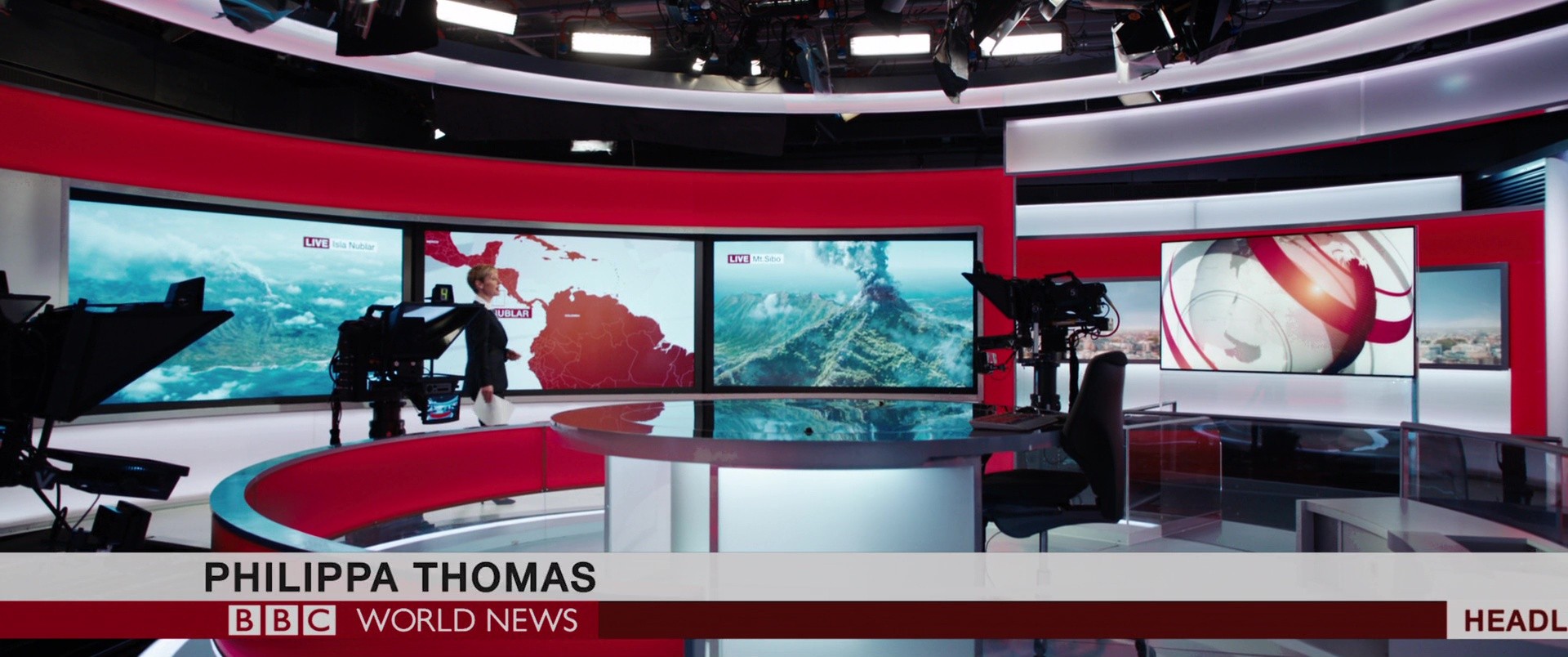
One of the primary systems was a broadcast-style news interface, designed to resemble real-world formats such as those used by organisations like the BBC. This required a careful balance between realism and cinematic clarity. The interface needed to feel authentic enough to be believable as a real news broadcast, while still being visually structured in a way that supported storytelling. Because of this, the designs required approval to ensure they aligned with recognisable broadcast standards.
Alongside this, the project involved designing map-based interfaces used within the film to explain locations, movements, and key action points. These systems needed to communicate spatial information quickly, helping the audience understand where events were taking place and how different elements of the story connected geographically.
Another key element was the use of holographic displays, which introduced a more advanced and futuristic layer to the technology. These systems required a different visual approach, using transparency, layering, and motion to create the illusion of depth and interactivity.
As with all cinematic UX work, the challenge was to ensure that each of these systems was instantly readable while still feeling like part of a cohesive technological world.
At the start of the project, the key challenge was understanding how different types of information needed to be communicated within the film. The story required multiple layers of data: global events, geographic locations, live updates, and strategic planning. Each of these required a different interface approach while still maintaining a consistent visual language.
One of the primary systems was a broadcast-style news interface, designed to resemble real-world formats such as those used by organisations like the BBC. This required a careful balance between realism and cinematic clarity. The interface needed to feel authentic enough to be believable as a real news broadcast, while still being visually structured in a way that supported storytelling. Because of this, the designs required approval to ensure they aligned with recognisable broadcast standards.
Alongside this, the project involved designing map-based interfaces used within the film to explain locations, movements, and key action points. These systems needed to communicate spatial information quickly, helping the audience understand where events were taking place and how different elements of the story connected geographically.
Another key element was the use of holographic displays, which introduced a more advanced and futuristic layer to the technology. These systems required a different visual approach, using transparency, layering, and motion to create the illusion of depth and interactivity.
As with all cinematic UX work, the challenge was to ensure that each of these systems was instantly readable while still feeling like part of a cohesive technological world.
The turning point in the project came when these individual systems were brought together into a cohesive cinematic UX ecosystem. Each interface—whether broadcast, map-based, or holographic—needed to function independently while also contributing to a unified visual language across the film.
The table-based map systems became a central storytelling device. These interfaces visualised geographic data, movements, and key events, allowing characters—and the audience—to understand complex scenarios at a glance. The design focused on clarity, using motion and visual hierarchy to guide attention and highlight important information.
The news feed interfaces played a different role, grounding the story in a recognisable real-world context. By referencing familiar broadcast styles, these systems helped bridge the gap between fiction and reality, making the events of the film feel more immediate and believable.
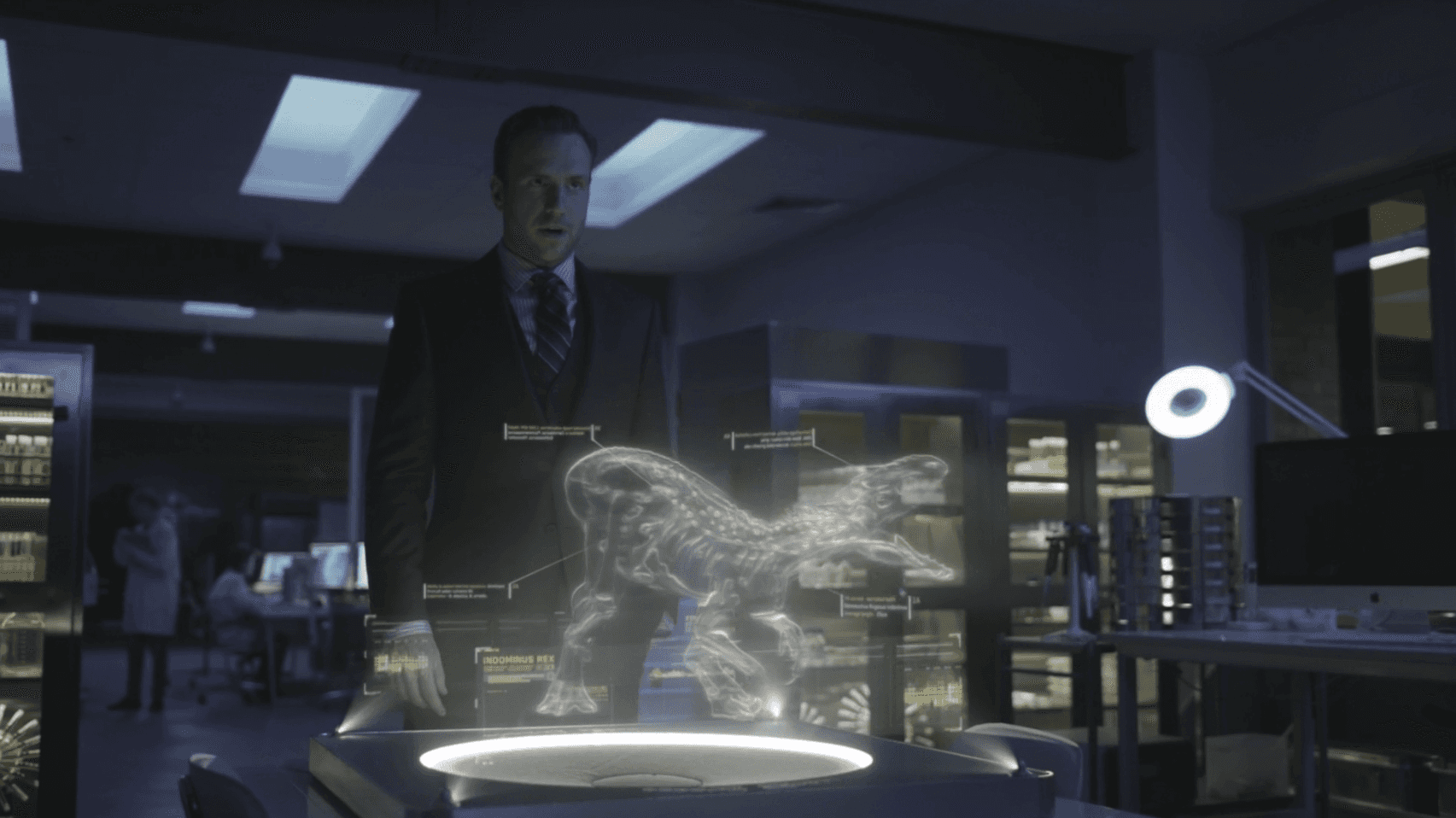
The holographic systems added a layer of spectacle and advanced technology. These interfaces used depth, animation, and layered visuals to create a sense of intelligence and sophistication. Designing these systems required thinking beyond flat screens, considering how information would exist in space and interact with the environment.
Throughout the project, I contributed to both the UX logic and visual design of these systems, as well as working with VFX teams to ensure that the interfaces integrated seamlessly into the film. Motion design and visual effects played a crucial role in bringing these interfaces to life, transforming static designs into dynamic cinematic elements.
The turning point in the project came when these individual systems were brought together into a cohesive cinematic UX ecosystem. Each interface—whether broadcast, map-based, or holographic—needed to function independently while also contributing to a unified visual language across the film.
The table-based map systems became a central storytelling device. These interfaces visualised geographic data, movements, and key events, allowing characters—and the audience—to understand complex scenarios at a glance. The design focused on clarity, using motion and visual hierarchy to guide attention and highlight important information.
The news feed interfaces played a different role, grounding the story in a recognisable real-world context. By referencing familiar broadcast styles, these systems helped bridge the gap between fiction and reality, making the events of the film feel more immediate and believable.
The holographic systems added a layer of spectacle and advanced technology. These interfaces used depth, animation, and layered visuals to create a sense of intelligence and sophistication. Designing these systems required thinking beyond flat screens, considering how information would exist in space and interact with the environment.
Throughout the project, I contributed to both the UX logic and visual design of these systems, as well as working with VFX teams to ensure that the interfaces integrated seamlessly into the film. Motion design and visual effects played a crucial role in bringing these interfaces to life, transforming static designs into dynamic cinematic elements.
As the project moved into final production, the integration between UX design and visual effects became increasingly refined. The interfaces were no longer standalone elements but fully embedded within the cinematic environment, responding to camera movement, lighting, and action.
The map systems successfully communicated spatial relationships and story progression, while the news interfaces reinforced the global impact of events within the film. The holographic displays added depth and visual interest, helping to differentiate advanced systems from more grounded technologies.
The collaboration between design and VFX ensured that all systems felt cohesive and believable, contributing to the overall immersion of the film. Each interface played a specific role in helping the audience understand what was happening, when it was happening, and why it mattered.
The result was a set of cinematic UX systems that supported storytelling while enhancing the visual language of the film.
As the project moved into final production, the integration between UX design and visual effects became increasingly refined. The interfaces were no longer standalone elements but fully embedded within the cinematic environment, responding to camera movement, lighting, and action.
The map systems successfully communicated spatial relationships and story progression, while the news interfaces reinforced the global impact of events within the film. The holographic displays added depth and visual interest, helping to differentiate advanced systems from more grounded technologies.
The collaboration between design and VFX ensured that all systems felt cohesive and believable, contributing to the overall immersion of the film. Each interface played a specific role in helping the audience understand what was happening, when it was happening, and why it mattered.
The result was a set of cinematic UX systems that supported storytelling while enhancing the visual language of the film.
Conclusion
Conclusion
The Jurassic World: Fallen Kingdom project demonstrated how UX and UI design can function as a core part of cinematic storytelling. By translating complex information into clear, visual systems, the interfaces helped audiences understand key narrative elements without disrupting the flow of the film.
The project required balancing realism with spectacle, ensuring that interfaces felt believable while still delivering visual impact. It also highlighted the importance of collaboration between design and VFX teams in creating seamless, integrated systems.
Ultimately, the work showed how interface design can extend beyond traditional products into storytelling environments, shaping how audiences perceive and understand the world on screen.
The Jurassic World: Fallen Kingdom project demonstrated how UX and UI design can function as a core part of cinematic storytelling. By translating complex information into clear, visual systems, the interfaces helped audiences understand key narrative elements without disrupting the flow of the film.
The project required balancing realism with spectacle, ensuring that interfaces felt believable while still delivering visual impact. It also highlighted the importance of collaboration between design and VFX teams in creating seamless, integrated systems.
Ultimately, the work showed how interface design can extend beyond traditional products into storytelling environments, shaping how audiences perceive and understand the world on screen.
Takeaways
Takeaways
Cinematic UX is a storytelling tool.
Interfaces help audiences understand complex narratives quickly and intuitively.Different systems require different design approaches.
Broadcast, map, and holographic interfaces each serve unique roles within the story.Realism enhances immersion.
Referencing real-world systems, such as news broadcasts, helps ground fictional events.Spatial and layered interfaces add depth.
Holographic systems expand how information can be visualised in cinematic environments.Collaboration with VFX is essential.
Seamless integration ensures that interfaces feel part of the world rather than overlays.
Cinematic UX is a storytelling tool.
Interfaces help audiences understand complex narratives quickly and intuitively.Different systems require different design approaches.
Broadcast, map, and holographic interfaces each serve unique roles within the story.Realism enhances immersion.
Referencing real-world systems, such as news broadcasts, helps ground fictional events.Spatial and layered interfaces add depth.
Holographic systems expand how information can be visualised in cinematic environments.Collaboration with VFX is essential.
Seamless integration ensures that interfaces feel part of the world rather than overlays.
Final
Final
More Work